
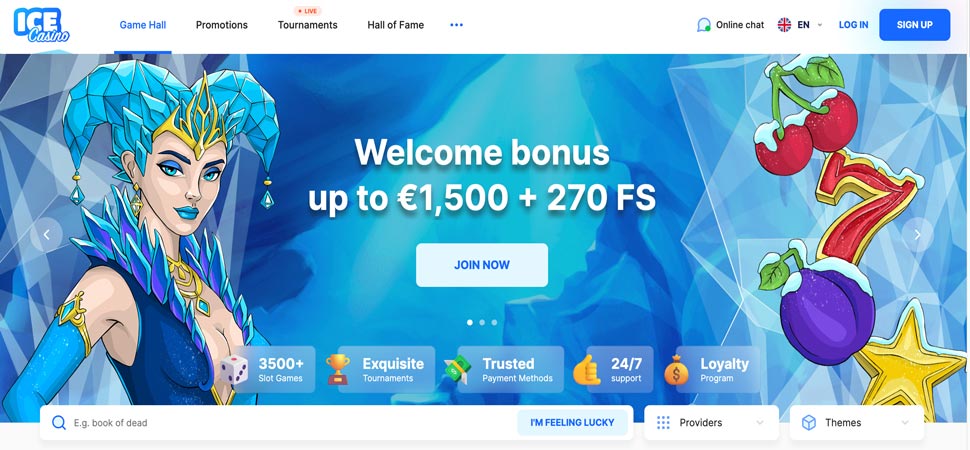
We employ the term lobby to describe the first screen you view after logging into the Ice Casino app https://icekaszino.org/en-nz2/app2/. It is the central hub where game tiles, banners, search tools, and account shortcuts sit together. As opposed to a flat list, the lobby arranges titles into slots, live casino, table games, and jackpots, with featured and new sections near the top. A search bar and filters enable you to reach a specific game or provider without endless scrolling. The screen also displays your balance, quick deposit button, and active bonus status, so you can see key details without leaving the main view. We designed it for touch first, with larger icons and thumb-friendly menus as opposed to a shrunken desktop page.
Understanding the Casino App Lobby Really Is
We call lobby to describe the first screen you encounter after logging into the Ice Casino app. It is the core area where game tiles, banners, search tools, and account shortcuts are grouped. Rather than a flat list, the lobby groups titles into slots, live casino, table games, and jackpots, with featured and new sections near the top. A search bar and filters allow you to reach a specific game or provider without endless scrolling. The screen also shows your balance, quick deposit button, and active bonus status, so you can see key details without leaving the main view. We designed it for touch first, with larger icons and thumb-friendly menus as opposed to a shrunken desktop page.
Guide to Download and Install the Ice Casino App
Getting started is straightforward, but the route varies by platform. Apple device users can use the App Store, look for Ice Casino, and start the download. The app installs like any other, then you access using your existing details. We suggest using only the official store so you receive the genuine, secure build. Those on Android will not see it on Google Play in many regions, including New Zealand, owing to real-money gambling rules. Alternatively, go to the official Ice Casino site from your mobile browser, go to the app page, and download the APK file. You must allow installs from unknown sources when prompted, then click the file to install. After that, we advise switching that setting back off for safety.
Navigating the Game Area: Structure and Important Parts
Once you sign in, the lobby uses a clear top-to-bottom layout. Your funds and a deposit button are placed at the top, so adding play is always one tap away. Below that, a horizontal banner strip showcases offers, tournaments, or new releases. The main menu usually stays fixed at the bottom, with symbols for the lobby, search, account, and extra settings such as responsible gambling settings. Under the banners, category strips let you scroll sideways through Top Picks, New Games, Slots, Live Casino, Table Games, and Jackpots. Each strip displays game thumbnails with labels and sometimes provider logos. Tapping a tile opens the game. A search icon lets you input a name or narrow by provider, which is useful when the library is large. We believe that understanding this layout quickly improves discovery.
System Compatibility and Platform Requirements
Before downloading, we suggest verifying that your phone satisfies the app’s basic needs. On Apple devices, the app typically demands iOS 12.0 or later, which supports many iPhones from the 5s onward, though 2 GB of RAM or more provides smoother lobby performance. Android users usually need version 8.0 or newer, supporting most phones released from 2017 onward. Tablets function too, and the lobby modifies its spacing for larger screens without losing touch controls. Screen quality impacts how crisp thumbnails appear, but older HD displays still function. Storage demands are modest because game data streams on demand. If you are unsure, consult the official mobile page for a compatibility list or live device check before installing.
On-Device Account Management and Banking
Handling your account from the lobby is intended to be frictionless. The account area, accessed from the bottom menu or profile icon, displays transaction history, personal details, and responsible gambling controls. You can set deposit limits, loss limits, or session reminders directly on your phone without using a desktop browser. We treat this as part of the lobby experience because quick access supports safer habits. The same area displays bonus status and wagering progress in a simple bar. Deposits and withdrawals employ the same secure methods as the main site, often featuring cards, e-wallets, and bank transfer options popular in New Zealand, with NZD supported where available. The deposit screen appears as an overlay, so you remain in the lobby flow. We encourage players to complete identity verification early to avoid cashout delays.
Game Selection Within the App Lobby
The app lobby provides the same broad game library as desktop, but it shows choices for quick mobile decisions. Slots make up the largest group, with classic three-reel games, modern video slots, and progressive jackpots organized in clear categories. Filters may let you narrow by features such as bonus buy or Megaways when available. The live casino area features real-time tables hosted by dealers, including blackjack, roulette, baccarat, and game shows. Each tile displays a preview image, and many titles offer demo play before you risk real money. We also feature games that work well on touchscreens. Older titles that use Flash or awkward controls are excluded or replaced with HTML5 versions. A recommended strip may guide you to portrait-friendly games, saving trial and error.
Speed, Data Usage, and Loading Times
We tune the lobby to display quickly on regular mobile connections because waiting spoils the flow. On a typical 4G network, the lobby commonly appears in under three seconds, with thumbnails appearing progressively. Image compression and caching ensure that once you view a category, going back to it later feels almost instant. Game launching follows the same approach: lightweight HTML5 slots open in a few seconds, while live dealer streams may require a little longer but remain comparable to video apps. Data use is small for slots, often about 5 to 10 MB per hour, but live casino video can use roughly 150 to 250 MB per hour. We advise Wi-Fi for long live sessions and checking your phone’s data settings if your plan is limited.
Safety and Integrity on Mobile
Protection in the app lobby rests on the same foundation as the desktop site. All communication is protected with TLS, so login details and financial transactions are shielded from interception. We do not store sensitive payment details in an unencrypted form on your device, and the app avoids unnecessary permissions such as contacts or photos. Biometric login, including fingerprint or face recognition, is enabled on compatible phones, adding security without slowing access. Integrity is unchanged on mobile: the app connects to the same certified random number generators and live dealer studios used by desktop players. Regulatory oversight applies equally, so a spin or card hand is not impacted by your device. The lobby also links directly to responsible gambling resources and self-exclusion tools, keeping safety visible rather than buried.
Moving Between the App and Desktop: What Is Different
When you play on both the app and desktop site, your account syncs seamlessly. Account balance, bonus progress, and game history are the same because they originate from the same server-side data. The main difference is layout. Desktop arranges content across columns and a persistent sidebar, while the app arranges sections vertically and uses swipeable strips. Some advanced filters or detailed game statistics may be condensed or moved into a secondary menu on mobile to declutter. In terms of functionality, most features remain available: live chat, promotions, tournaments, and account tools all function from the lobby. We suggest the app for quick sessions and desktop for longer play when you want a wider view of live tables or detailed reports.
One practical change is that a small number of older games built only for desktop may not appear in the mobile lobby. That number decreases as providers convert catalogues to HTML5, but it is worth knowing if you hunt for a favourite and cannot find it. We also notice minor differences in how promotions appear: desktop may show full terms in a side panel, while mobile positions them behind an info icon. Neither version is a trade-off. The app lobby is a parallel experience built for the way people actually use phones, with faster access to balance, games, and safety tools. Transitioning between them should feel like moving between screens, not changing accounts or dropping progress.
Recent Comments